

By Eyüp Canbay on Nov 13, 2026, 11:54:04 AM

Most teams still give remote access to internal infrastructure the same way they did ten years ago, a bastion host with an open SSH port, or a VPN concentrator with a shared client config. Both work. Both also carry a cost that only shows up when something goes wrong a port that gets scanned within minutes of going live, a departing employee whose VPN profile nobody remembers to revoke, a login that leaves no record of which resource was actually touched.
In this post, I'll walk through replacing that model with Cloudflare Zero Trust, a tunnel that keeps the origin server closed to all inbound traffic, and an identity-aware proxy that decides, per request, who gets through. I set this up originally just to see whether it held up under real use, and it's turned into the access pattern I'd now default to over a bastion host.
What's Inside?
- What is Cloudflare Zero Trust Access? the tunnel, and the identity-aware proxy sitting in front of it
- Why Move Off a Bastion Host or VPN? the four problems a network-level access model leaves open
- Setting It Up writing the Access Policies, wiring them into the Access Application, and the precedence order that decides which one wins
- Bastion/VPN vs. Zero Trust Tunnel a side-by-side comparison and what each column actually costs you operationally
- What This Looks Like Day to Day what changes for the person logging in, and for whoever has to investigate afterward
What is Cloudflare Zero Trust Access?
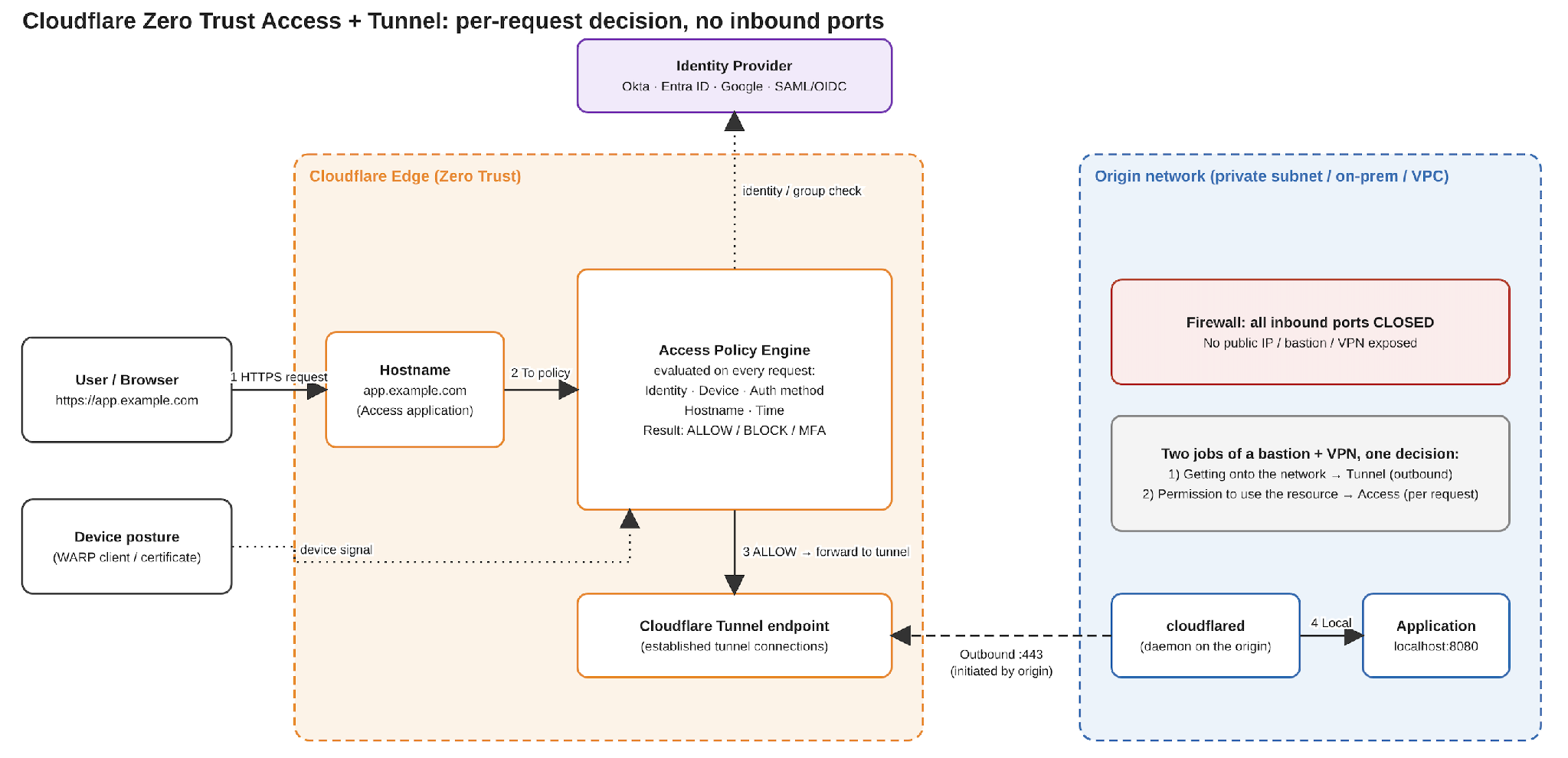
Cloudflare Zero Trust Access sits in front of a hostname and evaluates every request against a policy before it's allowed to reach the origin. It's paired with Cloudflare Tunnel (cloudflared), a daemon that runs on the origin and opens an outbound connection to Cloudflare's edge. Traffic to the hostname is carried over that outbound connection, so the origin never needs an open inbound port.
The combination replaces two things a bastion host or VPN does together getting onto the network, and being allowed to use what's on it with one decision made per request, is this identity, from this device, with this authentication, allowed to reach this specific hostname, right now.
Why Move Off a Bastion Host or VPN?
A bastion host or a traditional VPN grants network-level access, once a client connects, it can reach anything routable behind that gateway. The policy check happens once, at connect time, and not again for anything the client touches afterward. A few problems follow from that:
The entry point is always listening. An open inbound port is scanned whether or not anyone is using it right now.
Credentials sprawl. SSH keys end up in password managers, on laptops, in CI runners and rarely get rotated or fully revoked.
Access is binary. A VPN profile either lets someone onto the network or it doesn't. There's no native way to say “only from a managed device” or “only with a second factor.”
Audit trails are thin. A VPN log shows a connection. It doesn't show which internal host, path, or action followed it.
Setting It Up
Step 1 Close the origin and establish the tunnel
On the internal host, install cloudflared and authenticate it to the Cloudflare account:
| curl -L https://pkg.cloudflare.com/cloudflared-linux-amd64.deb -o cloudflared.deb sudo dpkg -i cloudflared.deb cloudflared tunnel login |
Create the tunnel:
| cloudflared tunnel create internal-portal |
Tell it what to forward to, in config.yml:
| tunnel: internal-portal credentials-file: /etc/cloudflared/internal-portal.json ingress: - hostname: portal.example.com service: http://localhost:8080 - service: http_status:404 |
Start the tunnel as a service but don't route DNS yet:
| cloudflared service install |
At this point the host's firewall can drop every inbound rule for this service the only way in is the outbound tunnel the host itself opened. portal.example.com doesn't resolve to anything yet, and that's deliberate, DNS comes last, after the Access Application and its policies are already in place.
Step 2 Write the Access Policies
A policy is a rule evaluated against the request's identity context, and it's created as its own resource, reusable across applications. Access evaluates policies in two separate groups: Bypass and Service Auth policies are checked first, independent of precedence; Allow and Deny policies are checked after, in precedence order. Start with the first group a Service Auth policy for a caller that can't go through an SSO login, like an uptime monitor hitting the hostname on a schedule. It still needs a credential, just not a human one:
|
resource "cloudflare_zero_trust_access_service_token" "healthcheck" { account_id = var.cloudflare_account_id name = "Uptime Monitor" }
resource "cloudflare_zero_trust_access_policy" "service_auth_healthcheck" { account_id = var.cloudflare_account_id name = "Service Auth for Uptime Monitor" decision = "non_identity"
include = [{ service_token = { token_id = cloudflare_zero_trust_access_service_token.healthcheck.id } }] } |
Next, a policy that denies a group outright, regardless of what else is true about them:
| resource "cloudflare_zero_trust_access_policy" "deny_contractors" { account_id = var.cloudflare_account_id name = "Deny Contractors" decision = "deny" include = [{ group = { id = var.contractors_group_id } }] } |
And the policy that actually lets people in: engineering, on the corporate domain, with MFA completed. The domain and group checks go under require, since both have to be true; include is left at everyone because there's no either/or condition here:
| resource "cloudflare_zero_trust_access_policy" "allow_engineering" { account_id = var.cloudflare_account_id name = "Allow Engineering with MFA" decision = "allow" include = [{ everyone = {} }] require = [ { email_domain = { domain = "example.com" } }, { group = { id = var.engineering_group_id } }, ] mfa_config = { allowed_authenticators = ["totp", "security_key"] } } |
Step 3 Define the Access Application
Create the Access Application for portal.example.com and attach the three policies to it. Service Auth doesn't need a precedence number to “win” Access checks it before Allow/Deny regardless but Terraform still requires every entry in the list to have one:
resource "cloudflare_zero_trust_access_application" "portal" {
|
Precedence here only governs the Allow/Deny pair deny_contractors has to sit before allow_engineering, or a contractor in the engineering group would match the allow rule first. service_auth_healthcheck's precedence value is almost incidental, Access evaluates Service Auth and Bypass policies as their own group, before Allow/Deny, no matter what number they carry.
Step 4 Route DNS now that Access is in place
With the policies attached to the application, it’s safe to make the hostname resolve. If the DNS record existed before the Access Application did, the hostname would be reachable with no policy in front of it at all:
| cloudflared tunnel route dns internal-portal portal.example.com |
From here on, every request to portal.example.com is evaluated against the policies above before it ever reaches cloudflared there’s no window where the hostname is both resolvable and unprotected.
Step 5 Policy precedence: the detail that trips people up
Access evaluates policies in two separate groups. Bypass and Service Auth policies are checked first, from top to bottom, independent of precedence. Allow and Deny policies are checked after, and that's where precedence and first-match-wins actually apply.
Within that second group, the order is deliberate, not arbitrary: deny_contractors sits at precedence 1, ahead of allow_engineering at precedence 2. A contractor who also happens to sit in the engineering group is still denied, because their request never reaches the allow rule at all. If the allow rule were checked first instead, it would match before the deny rule got a chance to.
Get this ordering backwards within the Allow/Deny group and a rule simply never fires: a broad allow placed ahead of a narrower deny matches first, every time, and the deny becomes dead configuration. Service Auth and Bypass don't have this problem they're not racing Allow/Deny for a match, they're checked before either one gets a chance to run.
Key Considerations
Exposed surface. A bastion host or VPN concentrator keeps an inbound port open around the clock. A Zero Trust tunnel keeps none cloudflared only ever opens an outbound connection, so there's nothing on the public internet to scan.
Auditability. A VPN log records a single “connected” event for the whole session. Access's authentication log records each login decision individually which policy matched, which identity, allowed or denied which is already more than a VPN gives you by default. Request-level detail beyond that, every path, every subsequent request in the session, needs Logpush's Access Requests dataset, which is an Enterprise feature. Worth knowing before promising a per-request audit trail on a lower plan.
Onboarding and offboarding. Revoking a leaving employee's access means distributing or revoking a VPN profile or SSH key today. With Access, it means removing them from an identity provider group the same action you'd already take when someone leaves.
Granularity. A VPN is all-or-nothing at the network level. Access is per-hostname, per-policy, and can require MFA or a managed device on top of identity controls a VPN profile has no native way to express.
What This Looks Like Day to Day
A user visiting portal.example.com is redirected to the identity provider login, then through the MFA challenge if the policy requires it. On the operator's side, that login decision, allowed, denied, which policy matched, lands in the Access authentication log by default. Compare that to a VPN log that shows nothing beyond “connected”, even the default here is an improvement, before Logpush ever enters the picture.
Conclusion
Closing the inbound port and moving the access decision to an identity-aware proxy removes the most common failure modes of a bastion host or VPN, a scannable entry point, access that outlives the person who needed it, and an audit log that shows a connection but not an action. It's also a migration that doesn't need a cutover window it can be rolled out one hostname at a time, running next to the existing VPN until every hostname has moved over.
References
· Cloudflare Tunnel Connect networks
· Terraform Registry cloudflare_zero_trust_access_application

Kloia partnership with Cloudflare

Seamless Updates with Canary Deployment on AWS EKS: Leveraging Istio, Argo CD, and Argo Workflows

No Comments Yet
Let us know what you think