

By Esra Sezer on Nov 6, 2026, 10:31:08 AM

Lawrence Berkeley National Laboratory ran the numbers and found that shifting workloads from on-prem to the public cloud cuts energy use by up to 87%. One stat, and it tells you most of what you need to know about where enterprise IT is going. Nearly every enterprise we talk to has either started their migration or is planning one in the next 18 months. The question stopped being whether to move. It's how to move without breaking things on the way.
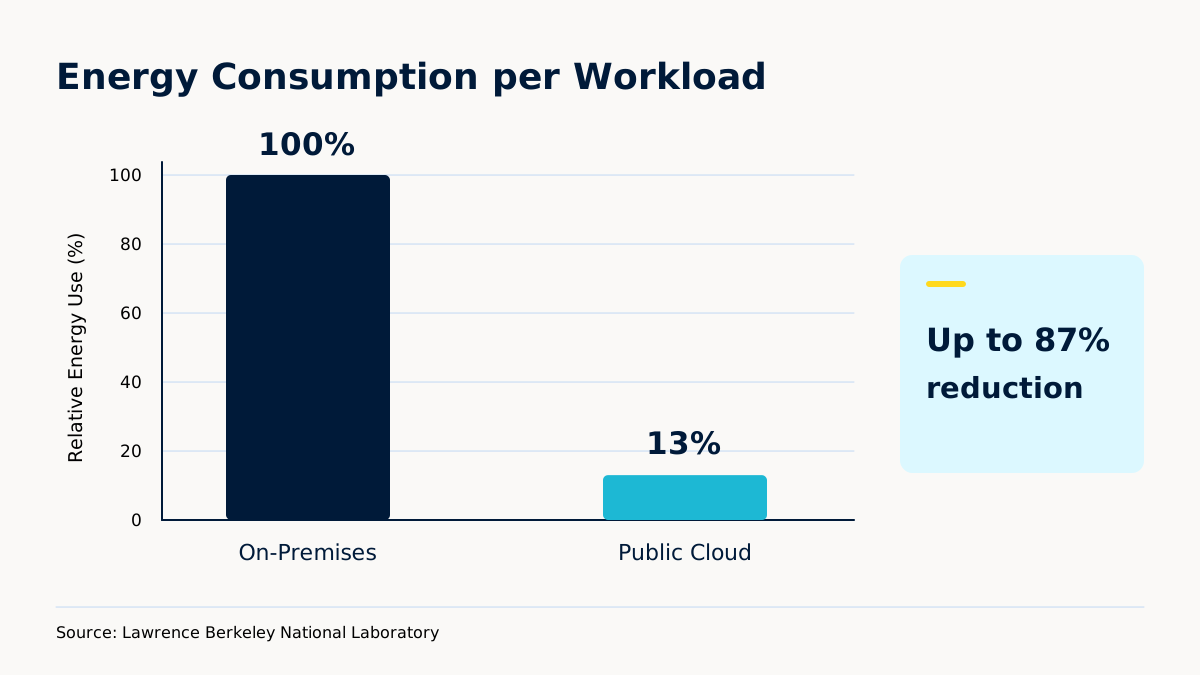
Source: Lawrence Berkeley National Laboratory
Figure 1. Public cloud workloads run at a fraction of the energy of on-prem equivalents.
This guide covers what matters: the seven real benefits, what the process actually looks like, and what changes when you bring in a consultancy like Kloia.
Short version. The seven benefits:
- Agility and flexibility
- Cost efficiency and resource optimization
- Security and compliance
- Collaboration and productivity across teams
- Access to advanced technologies
- Business continuity and disaster recovery
- Lower environmental footprint
What Is Cloud Migration?
Cloud migration means moving your digital assets, applications, data, infrastructure, from on-prem to a cloud platform. The technical description is the easy part. The real shift is organizational. How IT gets managed, scaled, paid for, and who gets to make calls about it. All of that changes. Often the finance team notices first.
Three approaches, and the right one depends on your starting point, your deadline, and where you want to end up.
|
Approach |
What it is |
When it fits |
Trade-off |
|
Rehost (lift & shift) |
Move the app with minimal code change |
Data-center exit deadline, or speed matters more than performance |
You carry the same architecture problems into the cloud |
|
Replatform |
Keep the app, swap a few components for managed services (RDS, ElastiCache, etc.) |
You want some wins without a full rebuild |
Partial re-engineering; the app still looks like its old self |
|
Refactor / re-architect |
Redesign for cloud-native. Containers, serverless, microservices |
Long-term scale and performance matter most |
Biggest engineering investment, longest timeline |
Table 1. The three main migration approaches. Most enterprise portfolios end up using all three.
Picking one strategy for the whole portfolio is a common early mistake. The database migrates differently than the batch job, which migrates differently than the customer-facing app. Kloia's job on the first few weeks of an engagement is sorting which workload belongs in which bucket, before anything moves.
Why Cloud Migration Matters for Digital Transformation
Digital transformation stopped being a slide in a board deck years ago. It's operational now. The enterprises that are still competing are the ones that can move fast, react when the market shifts, and ship capabilities without a six-month procurement cycle in the middle.
Cloud makes that possible. Spin up environments in minutes instead of weeks. Test ideas without committing to hardware. Handle demand spikes without buying for peak load that happens three times a year. The speed advantage shows up in roadmaps that actually get delivered on time.
The environmental piece matters too. Berkeley's number again: up to 87% less energy per workload. For anyone with sustainability commitments on the books, this is a rare case where the cheap option and the responsible option are the same option.
Kloia's work focuses on getting enterprises to AWS and Kubernetes with the speed part intact. The goal of every engagement isn't just moving workloads. It's leaving the client in a place where they can keep improving after we're done.
7 Strategic Benefits of Cloud Migration
1. Agility and Flexibility
Scale is the first thing you feel. On-prem, you build for peak load and pay for idle capacity most of the year. Cloud flips that. Use what you need, pay for what you use.
The real win isn't the bill. It's time-to-market. Dev teams stop waiting for hardware. Environments show up on demand. Experiments run in parallel. Features ship faster. For companies in a serious competitive market, speed is worth more than the cost savings.
DevOps pipelines are what make this real. Infrastructure-as-code, CI/CD, automated deploys. Without those, a cloud environment is just somebody else's computer with a worse bill. Kloia's DevOps work is about building the plumbing that turns cloud into an actual speed advantage.
2. Cost Efficiency and Resource Optimization
Traditional IT is fixed-cost. Servers, networking, data center space, the team to keep it all running. All of that costs the same whether you're at 20% utilization or 80%. Cloud rewires it. Cost tracks consumption.
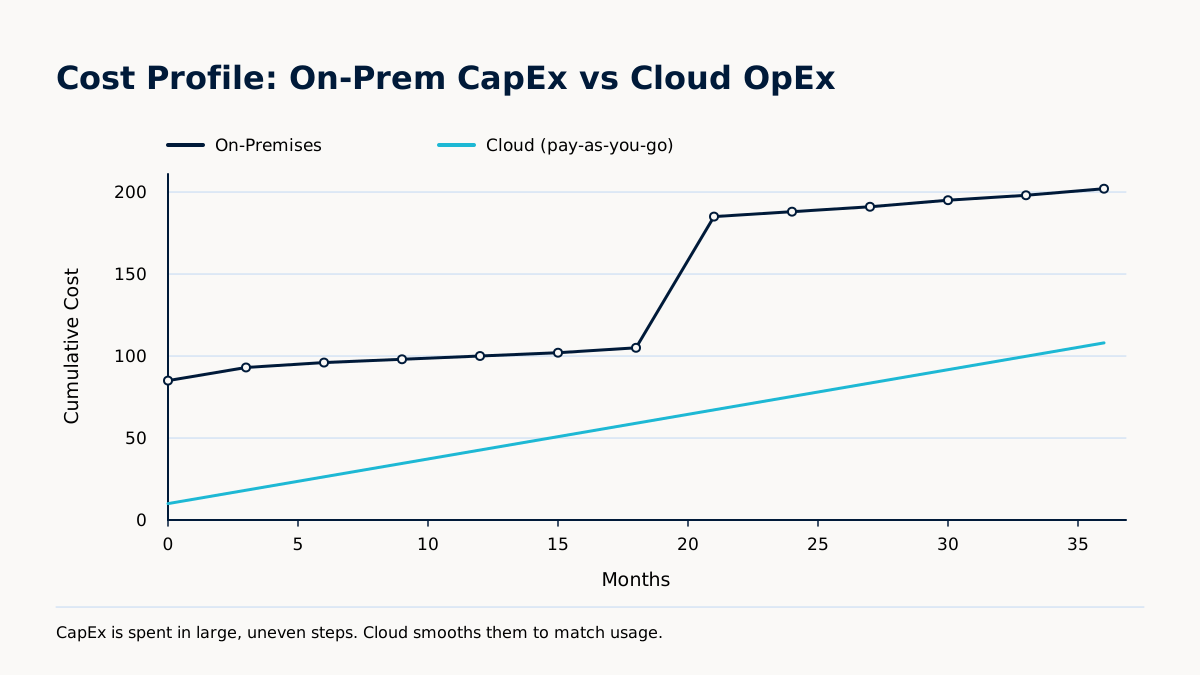
Figure 2. On-prem costs come in large, uneven steps. Cloud smooths them to match usage.
The capex-to-opex shift gets most of the headlines, but TCO improvements come from the quieter stuff. No more hardware refresh cycles. No data center overhead. Easier to retire the systems nobody wants to touch on-prem because killing them means someone has to unrack something.
Side by side:
| Factor | On-Premises | Cloud |
| Upfront investment | Large capex | Near zero |
| Scaling cost | Overprovisioned, fixed | Pay per use |
| Hardware maintenance | Your team's problem | Provider's problem |
| Disaster recovery | Buy it twice | Built-in, cheaper |
| Change speed | Procurement-bound | Minutes |
| Energy costs | You pay the bill | Shared, optimized |
Table 2. On-premises vs cloud on the factors that drive real cost.
One honest warning. Cloud bills grow fast when nobody's watching them. Dev teams spin up resources, forget about them, move on. By quarter three you're paying for things nobody remembers provisioning. This is where FinOps comes in. Kloia's FinOps work is the follow-through: tagging, rightsizing, reserved-instance planning, and the ugly job of identifying what to turn off. Not glamorous. Pays for itself inside a quarter in most cases.
3. Security and Compliance
Security is still the first question in the first meeting, and it should be. The data lives in the cloud now.
In practice, AWS, Azure, and GCP spend more on security than any single enterprise realistically can. Encryption at rest and in transit, IAM, continuous monitoring, automated threat detection. All built in.
Compliance frameworks are mostly done for you at the platform level. HIPAA, PCI DSS, SOC 1 and 2, ISO 27001. Your team still has work to do, but the floor is a lot higher.
The thing to keep in mind: security in the cloud is shared. The platform handles the infrastructure. You handle configuration. Misconfigured S3 buckets are the classic example and still account for a surprising share of breaches. Kloia's architectures use least privilege by default, network segmentation at the account level, and policy-as-code so configuration doesn't drift once nobody's looking.
4. Collaboration and Productivity
Cloud platforms pull tools, data, and workflow into one place in a way on-prem never did. For a distributed team, that's the day-to-day experience. A team member in Istanbul, Amsterdam, or Austin hits the same systems and works on the same data.
The practical wins are small individually. Real-time doc editing. File sharing with access controls that aren't terrible. Integrated chat. Mobile access that works. Put them together across a global team and you're saving hours a week per person that used to go to version conflicts and access tickets.
Managed services keep these environments healthy. Monitoring, patching, performance tuning. Handled in the background so the teams depending on them can focus on actual work.
5. Access to Advanced Technologies
Once the infrastructure is in the cloud, a lot of hard things get easier. AI, ML, big data analytics, IoT, serverless. All managed services from the major providers. You activate them. You don't build them.
On-prem, a basic ML pipeline needs specialized hardware, people who know how to run it, and a budget commitment before you can show a single result. In the cloud, the same pipeline is configured in hours. That changes who gets to experiment, how often, and how fast you learn what works.
Kloia's AI integration work usually starts here: wiring AI into an existing application, or rebuilding a legacy system as cloud-native. The code is the smaller problem. The design decisions are where consultancy earns its keep.
6. Business Continuity and Disaster Recovery
On-prem DR is expensive, complex, and almost never tested enough. Duplicate hardware, replication setup, test runs that nobody wants to schedule because they take the system down. When a real outage hits, recovery takes hours or days.
Cloud DR changes the math. Automated backup, geographic replication, failover built into the platform. A lot of it kicks in without human intervention.
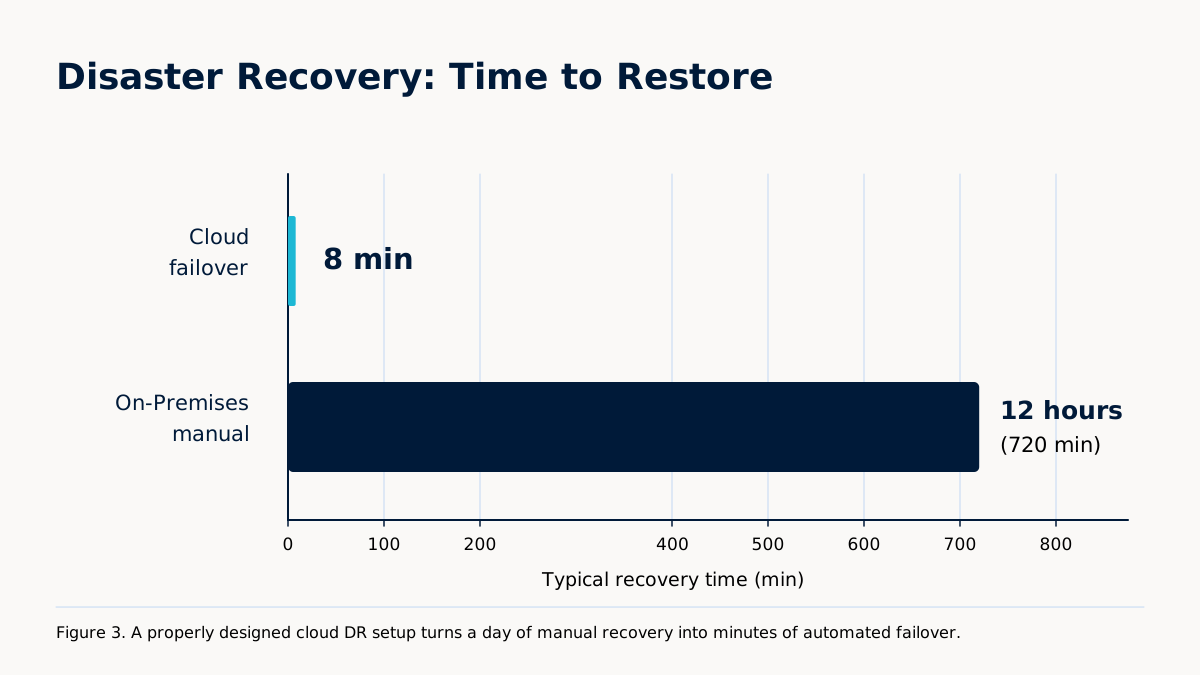
Figure 3. A properly designed cloud DR setup turns a day of manual recovery into minutes of automated failover.
Concrete picture: primary data center loses a storage array at 2 a.m. On-prem, that's the on-call engineer waking up and spending the night on manual failover. Cloud setup with active-passive across availability zones reroutes traffic to the secondary before most users refresh the page.
Resilience planning is part of every Kloia migration engagement, not an add-on. Getting workloads into the cloud is one thing. Making sure they survive the day the primary region has a problem is the thing that matters at 3 a.m.
7. Environmental Sustainability
IT's energy footprint is a real conversation now, with leadership, with sustainability teams, and with regulators. On-prem data centers are energy-hungry, and most of that energy pushes servers that sit at low utilization most of the time. Cloud providers run at a scale where optimization is worth real money to them, and the efficiency shows up as lower energy per workload.
Berkeley's number: up to 87% less energy and associated carbon compared to on-prem. For anyone with net-zero targets or ESG reporting, that's a measurable number you can put in the report, not a soft commitment.
The business case is converging with the ethical one as customers, investors, and regulators start paying attention. Kloia helps enterprises get to cloud-native platforms that support sustainability goals and don't make performance or cost worse in the process.
Best Practices for a Successful Cloud Migration
Most migrations are won or lost before the first workload moves. The preparation phase is where the real work is. Skipping it creates problems that are cheap to fix now and expensive to fix after you've shipped.
Start with workload readiness. Not every application is cloud-ready on day one. Some depend on hardware-specific setups, legacy protocols, or third-party integrations that need review first. A thorough assessment splits the portfolio into three buckets: what moves first, what needs work before it moves, what should be retired instead of migrated. That last bucket almost always gets skipped. It shouldn't.
Set objectives early, and make them specific. A migration without defined success metrics drifts into scope creep and missed dates. Pick the two or three things you actually want (cost reduction, performance, faster deploys, compliance alignment) and track against them weekly.
Get stakeholders aligned before technical work starts. Cloud migration touches finance, security, legal, and ops as much as it touches IT. Looping those teams in at the start is boring work that pays off later. Skipping it means you find out in month six that legal has a problem with where the data lives.
Data governance planning runs in parallel with the technical plan, not after it. Know where sensitive data lives, how it's classified, what controls apply, before anything moves. For regulated industries this isn't a nice-to-have.
Automation is the thing that saves you. Automated testing, infrastructure deployment, validation checks. Manual processes miss errors that get expensive after go-live. Kloia's engagements build these in from the assessment through cutover, so what you ship is production-ready, not demo-ready.
Common Cloud Migration Challenges and How to Overcome Them
Most migrations run into the same four problems. The ones that go well plan for them in advance.
| Challenge | What actually helps |
| Data security and privacy | Encrypt before anything moves. Lock down access per workload. Review security at every phase, not just at the end. |
| Migration downtime | Off-peak windows. Blue-green or parallel-run setups. Zero-downtime designs for the systems that need it. |
| Application compatibility | Containerize. Run it on Kubernetes (EKS, AKS, or GKE depending on the cloud). The app behaves the same everywhere. |
| Internal skills gap | Managed services fill the gap without you building a full cloud ops team in-house. |
Table 3. The four challenges that come up on almost every enterprise migration, and the practical response to each.
Data security and privacy is where the executive conversation usually starts. The response is a mix of technical controls and process discipline. Encrypt before moving. Access controls per workload, not blanket. Security review at each phase, not a single check at the end. Kloia's architectures build security in from day one rather than bolting it on after go-live.
Downtime is where customer-facing teams get nervous, with good reason. Off-peak windows help. Blue-green deployments help more. Parallel-run environments, where the old and new systems run side by side until confidence is high, are the right call for critical workloads. Zero-downtime migrations are achievable for anything that justifies the engineering cost.
Application compatibility shows up when legacy apps assume specific OS versions, library dependencies, or hardware configuration that doesn't translate cleanly. Containerization is the most reliable answer here. Package the app with its dependencies, run it anywhere, forget about the underlying box. Kubernetes handles the orchestration once you're at any kind of scale, which is why Kloia's Kubernetes work keeps coming up in migration projects that started as something else.
Skills gaps are the one nobody plans for enough. Running a cloud environment well needs different skills than running a data center well, and the people who were great at the second thing are not automatically great at the first. The honest options: hire the gap closed (slow and expensive), train the team (slow), or partner for managed services. Kloia's managed services fill the operational side so the internal team gets to focus on the strategic work.
Choosing the Right Cloud Platform for Your Business
Three serious providers. All offer the full stack. The right one depends on what you already run and what you want to do next.
| Provider | Strongest for | Typical fit |
| AWS | Breadth of services, mature partner ecosystem, more regions than anyone | Default pick when nothing pulls you elsewhere |
| Microsoft Azure | Tight AD, Microsoft 365 and Windows Server integration | Shops that already run on Microsoft |
| Google Cloud (GCP) | BigQuery, Vertex AI, GKE | Data-heavy teams, Kubernetes-first shops |
Table 4. Where each major cloud provider is strongest, and the kind of organization each fits.
When choosing, look at pricing structure (favors different usage patterns), service depth (AI, databases, compliance tooling), geography (latency and data residency), and technology fit (how well it matches your existing tools).
Kloia's deep bench is on AWS, but the recommendation is platform-agnostic. The point of the exercise is picking the environment that fits the client's actual situation, then configuring it right the first time. Fixing a bad cloud setup after a year of running on it costs more than doing it right at the start.
What Does the Future of Cloud Adoption Look Like?
Cloud isn't a destination. It's a direction. The teams that stay ahead are the ones with a strong foundation now and the discipline to keep improving.
A few things are shaping where this goes. Hybrid and multi-cloud are the default at enterprise scale now, usually to avoid vendor lock-in, meet data residency rules, or run specific workloads on their best-fit platform. Managing across platforms needs real governance, consistent tooling, and policies that actually get enforced.
Edge computing keeps growing because some data needs to be processed close to where it's generated. Factories, retail locations, connected vehicles. Edge doesn't replace cloud, it extends it. The pattern is: process at the edge, sync what matters back to the center.
AI-driven optimization is moving into cloud ops itself. Tools that watch resource patterns, predict demand, flag anomalies, recommend config changes. Teams with well-structured cloud environments benefit here first. Teams whose infrastructure is a mess still just get noise.
Serverless keeps gaining ground because it takes infrastructure management off the table entirely. For workloads with variable demand, it's often meaningfully cheaper than running instances around the clock. The catch is that serverless has its own complexity, especially around observability and cold starts, which is why nobody's running everything serverless yet.
Kloia's approach is built around all of this. Migration is the start of the journey, not the end. Every engagement is set up to leave the client in shape to keep improving.
How Kloia Helps Enterprises Migrate to the Cloud with Confidence
End-to-end. From the first strategy conversation through architecture, migration, and ongoing managed services. One partner across the whole thing, which matters more than it sounds like it does.
Here's why: a successful enterprise migration needs expertise in DevOps, security architecture, data governance, cost management, platform engineering, and application modernization. Building all of that in-house takes years. Kloia brings it on day one.
Day-to-day, the work breaks down like this. DevOps work speeds up deployment and cuts incident risk. FinOps makes sure cloud spend returns something. Platform engineering gets the environment to optimized, not just working. AWS and Kubernetes depth leads to architectural decisions that hold up as the environment scales.
If you're evaluating cloud migration, or looking for more from the cloud investments you've already made, talk to the Kloia team. The first conversation is about your business, not a sales pitch.

AWS Cloud Cost Savings by Migrating Kubernetes Workloads to Graviton
How to Enable Live Migration in KubeVirt with AWS FSx and OpenShift

No Comments Yet
Let us know what you think