
.svg "kloia.png")
By Eren Takak on Oct 7, 2026, 8:29:51 AM

2025 and 2026 were the boom years for enterprise AI. Now almost every company is building an AI assistant, one that lets employees ask questions and connects to the company's relevant knowledge sources (documents, wikis, ticketing systems), turning into an assistant that returns an answer within seconds. Most of these assistants are built on enterprise RAG, and bringing these assistants into our lives has never been easier: ready made frameworks, ready made protocols, a working demo in a few days.
But there's a question this ease leaves behind, one that turns out to be the most important AI data security problem in most work environments. Who can access what?
An AI assistant by definition, has the power to read every source it identifies. When an employee asks a question, the assistant scans these sources to find the answer. But what if the most relevant document it finds is one the employee normally has no permission to access? In a poorly designed system, the assistant includes that document in its answer with no error thrown, no alarm raised. This is why RAG access control isn't an afterthought; it's the layer that decides whether the whole system is safe to use.
This is what sets access control apart from other engineering problems. Most errors are noticeable: the system crashes, a test gives errors, a page won't open. You notice. But an access control error is silent. The system appears to be working fine, the user gets their answer, until someone realizes they've seen data they were never meant to see. And often that moment never comes; the leak just carries on, unnoticed.
This article looks at enterprise RAG security from one specific angle, the layer that must be solved first: when the assistant retrieves information, how does it show that information only to the person authorized to see it?
The Basics: how does the assistant find information?
To understand why access control is hard, we first need to take a quick look at how an AI assistant presents information.
Most modern enterprise assistants rely on the technique called RAG (Retrieval-Augmented Generation). When a user asks a question, the assistant itself doesn't hand the question directly to the language model. First, it searches the company's pool of documents and pulls out the handful of passages most relevant to the question, the retrieval step. Then it hands those passages to the model along with the original question and asks it to build an answer grounded in them, called the generation step. The whole point is to stop the model from inventing things and to anchor every answer in real company data.
For this search process to work, the documents need to be prepared in advance. The assistant can't read all the files end to end on every question, that would be too slow and inefficient. Instead, documents are scanned, split into small chunks, and written into a searchable index. So when a question comes in, the assistant scans this ready index rather than the whole company.
This is exactly where access control comes in. An ACL (Access Control List), in its simplest form, is a "who can see what" list, specifying which users or groups each document, file, or record is open to. In traditional systems, this list is checked when a user wants to open a file.
But it's totally a different situation with the assistants. The assistant doesn't open a single file. While looking for an answer to a question it scans dozens of documents at once and selects the most relevant ones. Therefore access control has to become part of the search process. The system must eliminate the results the user isn't authorized for before those results are returned. In the industry this process is called security trimming, trimming the search results according to the permissions of the person making the query.
It might sound simple: "remove the unauthorized ones, show the rest." But doing this correctly in an AI assistant is much harder than it looks.
How is it solved? A layered defense
The secret to getting access control right isn't a single mechanism, but several layers stacked on top of each other. Each layer has a weak point; but stacked together, one covers another's gap. Let's look at the three that work best in practice.
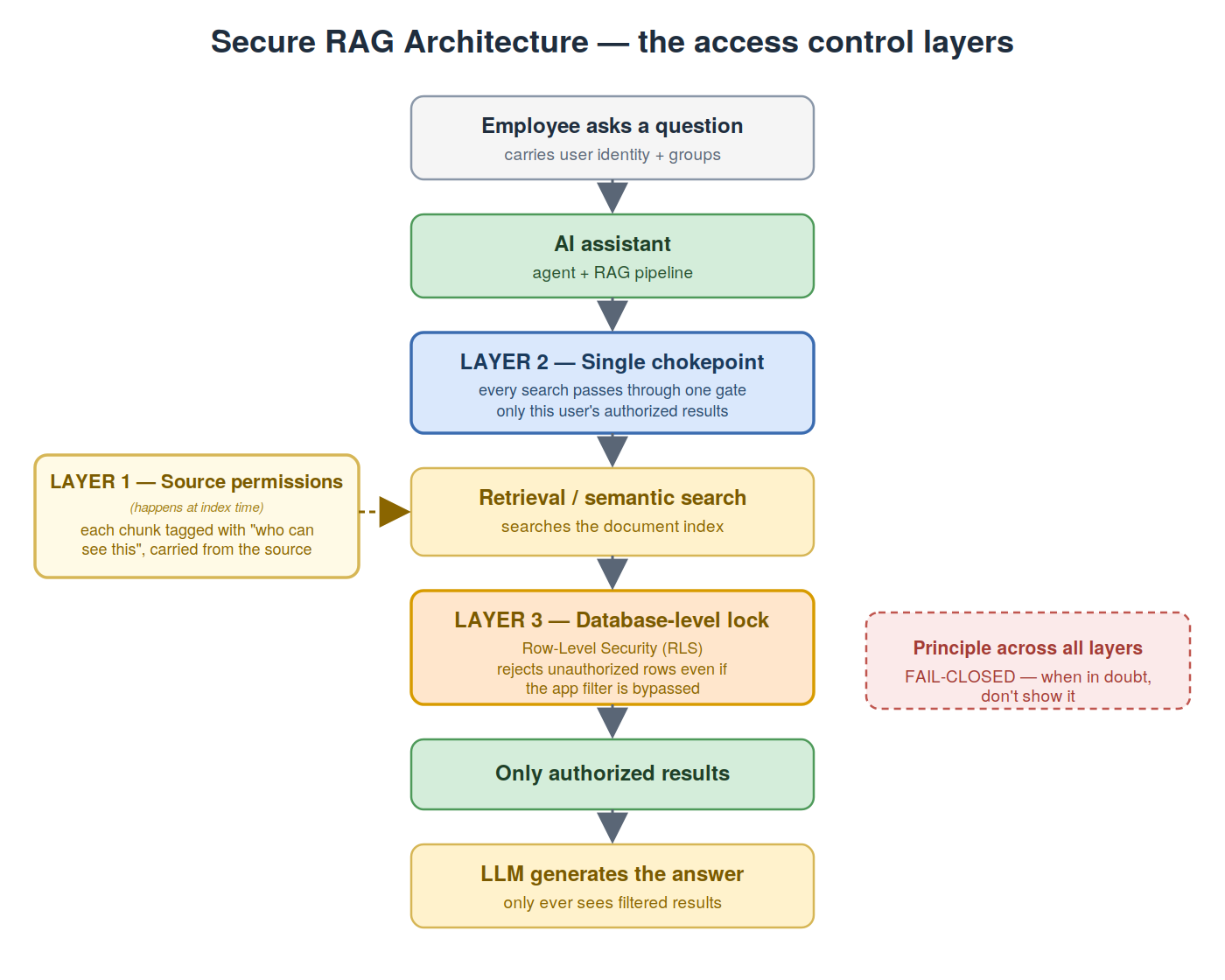
1. Carrying permission information from the source.
As each document chunk is written into the index, the information about "who can see this document" must be written alongside it. This information isn't invented, it's carried over as is from the document's original source (a file store, a wiki). That way, when a search runs, the system not only knows the text but who that text is open to. The critical point is the permission must be carried with the document, from the very beginning, not guessed at later. If this layer is skipped, or permissions are carried incorrectly, results can come back with the wrong authorization and the whole thing is broken before it even starts.
2. A single chokepoint.
Every search must pass through one single gate. This gate automatically appends to every query the condition "…and only the results this user is authorized to see." Why a single gate? Because if searches can be run from dozens of places in the system, a developer might forget to add the filter in one of them and that one lapse is a leak. A single chokepoint makes an unfiltered query impossible from the outset which removes the chance of the filter being forgotten somewhere.
3. A lock at the database level.
As a final safety net, filtering must be applied not only in the application code but in the database itself. Modern databases can enforce the rule "this user can only see the rows they're authorized to" at the database level (this is called Row-Level Security, or RLS). That way, even if the filter in the application layer is somehow bypassed, the database refuses to return unauthorized data. This is the last safety net that kicks in when all the other layers fail, and that's why it's indispensable.
How this looks on AWS
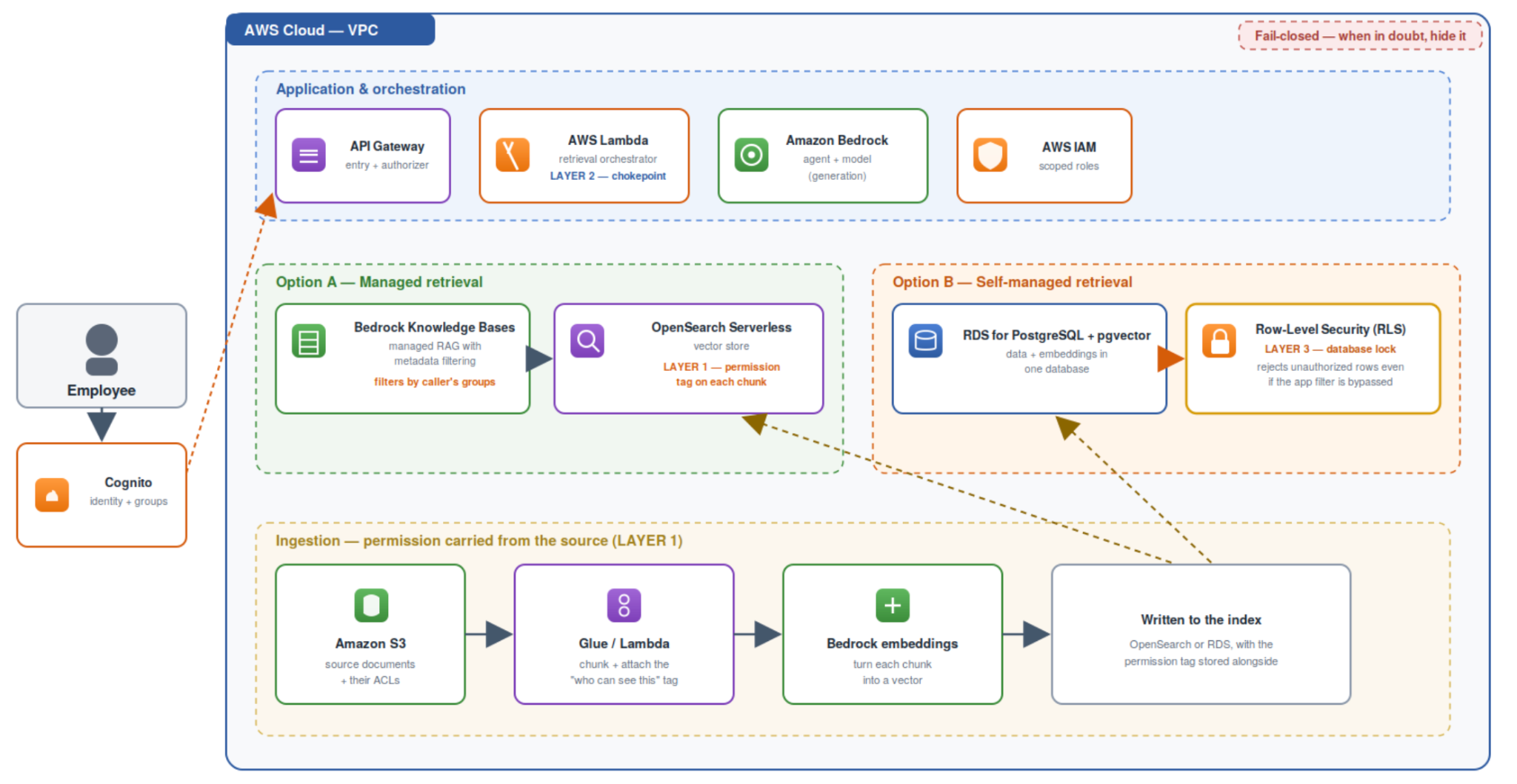
So far we've described the three layers in the abstract. On a real platform, each one maps to concrete services, and a typical Bedrock based setup on AWS looks as given. The user's identity and group membership come from Amazon Cognito, and every request runs under a scoped AWS IAM role, so the system always knows who is asking. The assistant itself runs on Amazon Bedrock, which provides both the agent that orchestrates the flow and the foundation model that writes the final answer.
Between the assistant and the data sits a single AWS Lambda function that acts as the retrieval orchestrator, our Layer 2 chokepoint. Every query passes through it, and from there it reaches the retrieval layer, where there are two common paths. The managed path uses Amazon Bedrock Knowledge Bases with a vector store such as Amazon OpenSearch Serverless, Knowledge Bases applies metadata filtering so a query only ever touches the chunks the caller's groups are allowed to see. The self-managed path keeps the vectors inside Amazon RDS for PostgreSQL with the pgvector extension, so a single database holds both the data and its embeddings. That second path has one big advantage: PostgreSQL's Row Level Security (RLS) becomes the third layer, a lock at the database itself that rejects unauthorized rows even if a bug upstream lets a bad query through.
Documents land in Amazon S3 with their original ACLs, a pipeline built on AWS Glue or AWS Lambda splits them into chunks and attaches the "who can see this" tag, Amazon Bedrock turns each chunk into a vector, and the result is written to the index. The permission travels with the data from the very first step. The services are AWS specific, but the principle underneath is the same one we've described all along.
So why do most projects skip this?
Having seen how critical access control is, a question comes to mind: “if it's this important, why do so many AI assistant projects handle this layer far too late, or skip it entirely?”
A pattern emerges when looking at AI assistant projects in the open source world. Most of these projects direct their attention to the question "how good are the assistant's answers": better search, smarter routing, more accurate answers. These are exciting, visible, demonstrable problems. Access control, on the other hand, is an invisible problem. When it works properly, no one notices, and you don't need it to show that something "works" in a demo.
A second reason is that most assistants are designed for a single user or a trusted team. In an environment where everyone can see everything, "who can see what" is a meaningless question. But when an assistant grows from a personal tool into a system used by hundreds of employees at different permission levels inside a real company, that question suddenly becomes the most critical one. And at that point, adding security to a system that wasn't built with it from the start is far harder.
Because the real issue is that access control isn't a feature you can bolt on afterward. Carrying permission with the document, routing every search through a single filtered gate, having the database lock itself down, these are all fundamental decisions about how the system is built. Reversing these decisions after the system is up is often as costly as rewriting it from scratch.
Therefore, the right approach is to treat access control as part of the architecture from day one. Not as a feature to be left for last, but as the first layer you draw.
TL;DR
- Enterprise AI assistants are powerful because they can read every source they connect to, but that's exactly why "who can see what" is a layer that must be solved from the very beginning.
- An access control bug is different from other bugs. It's silent. The system doesn't crash, the test doesn't turn red; the user gets an answer that looks fine, along with unauthorized data. That's why it can go unnoticed for months.
- Access control is hard in an assistant because there's no single gate to guard (every search result must be filtered), permissions come from the source and change constantly (the risk of stale access), and the failure is invisible.
- The solution is layered. Carry permission information with the document from the source, route all searches through a single filtered chokepoint, and set up a final safety net with a database-level lock (RLS). On top of it all, one unbreakable principle. When in doubt, don't show it (fail-closed).
AI assistants are fast becoming part of every company. What makes them truly trustworthy won't be how smart their answers are, it will be that they never show anyone something they were never meant to see.
Building a Secure Enterprise AI Assistant?
Access control should be part of your AI architecture from day one, not an afterthought.
As an AWS Partner, we help organizations design and implement secure, scalable Generative AI solutions that integrate with their existing enterprise knowledge sources and securiy requirements.
Let’s discuss your Enteprise AI use case.
Contact our GenAI team…
References
- Microsoft. Security filters for trimming results in Azure AI Search. https://learn.microsoft.com/en-us/azure/search/search-security-trimming-for-azure-search
- PostgreSQL. Row Security Policies. PostgreSQL Documentation. https://www.postgresql.org/docs/current/ddl-rowsecurity.html
- Amazon Web Services. Amazon Bedrock Knowledge Bases. AWS Documentation. https://docs.aws.amazon.com/bedrock/latest/userguide/knowledge-base.html
- Amazon Web Services. Using pgvector and Amazon RDS for PostgreSQL. AWS Documentation. https://docs.aws.amazon.com/AmazonRDS/latest/UserGuide/CHAP_PostgreSQL.html
- Amazon Web Services. Amazon Cognito user pools and groups. AWS Documentation. https://docs.aws.amazon.com/cognito/latest/developerguide/cognito-user-pools.html

How to Optimize MCP Token Usage (Without Replacing It With Bash)
Understanding Load Balancing Across OSI Layers: Layer 3, Layer 4, and Layer 7
-1.png)
No Comments Yet
Let us know what you think