
.svg "kloia.png")
By Tarık Guven on Jan 8, 2026, 8:45:18 PM

After years of manually wrestling with MSSQL to PostgreSQL conversions using SCT and DMS, I finally got my hands on AWS Transform SQL. I put it through its paces on a production-scale database with 1,500+ stored procedures. The results? Surprisingly impressive - and a few gotchas worth knowing about.
What is AWS Transform SQL?
AWS Transform SQL is an agentic AI-powered database modernization service introduced by AWS at re:Invent 2025 (December 2025). The service automates the migration of Microsoft SQL Server databases to Amazon Aurora PostgreSQL, leveraging Amazon Bedrock large language models for intelligent code transformation.
AWS Transform SQL addresses a long-standing challenge in database migration: the conversion of complex SQL constructs that traditional Schema Conversion Tool (SCT) cannot handle automatically. While conventional tools often fail on intricate stored procedures, functions, and database-specific syntax—leaving engineers to manually rewrite significant portions of code—AWS Transform SQL uses GenAI to analyze, understand, and convert these complex constructs while preserving business logic integrity.
The service provides a unified workflow that combines schema conversion and data migration (via DMS) in a single interface, guided by a natural language AI assistant. It generates dual assessment reports: a standard SCT report and a GenAI conversion report, with AI-generated code blocks clearly marked for human review. AWS claims the service accelerates modernization timelines by up to 5x and reduces operating costs by up to 70% through elimination of SQL Server licensing fees. Currently, only Microsoft SQL Server is supported as a source, with Amazon Aurora PostgreSQL (version 15+) as the sole target database.
If you've ever spent days manually fixing SQL statements that Schema Conversion Tool couldn't handle, you know the pain. The MERGE statement alone has probably cost database engineers thousands of hours collectively. So when AWS announced GenAI-powered SQL transformation, I had to test it myself.
The Test Subject: A Complex Enterprise Database
I didn't want to test on a toy database. I used a real enterprise system with:
- 1,500+ stored procedures and functions - many with nested calls and complex business logic
- Extensive trigger usage - including multi-table triggers
- Custom data types throughout the schema
- Complex join structures and cross-table relationships
This is the kind of database that makes traditional SCT conversions a multi-week affair. Perfect for testing AWS Transform's GenAI capabilities.
Getting Started with AWS Transform
The first thing I noticed was how streamlined the setup process is compared to our traditional workflow. You start by creating a workspace - essentially a container for your transformation jobs.
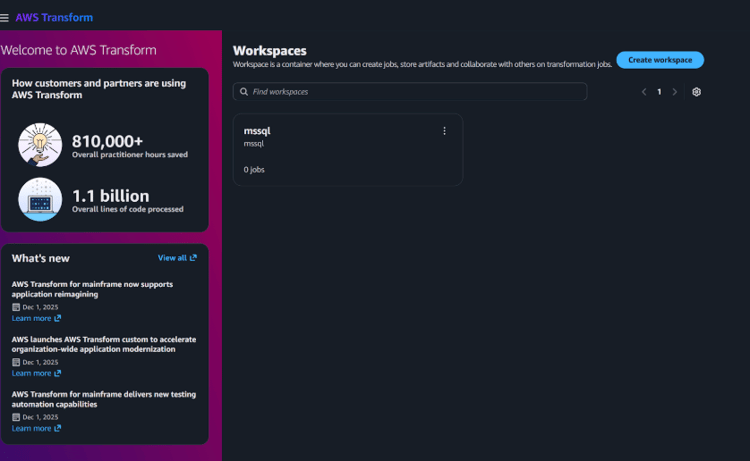
The AWS Transform console prominently displays adoption metrics - 810,000+ practitioner hours saved and 1.1 billion lines of code processed. That's a bold claim to validate
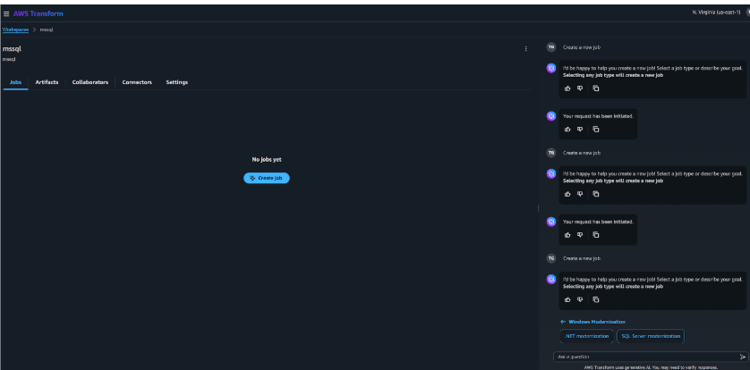
Creating a new job is straightforward - select SQL Server modernization and an AI assistant guides you through the process.
What struck me immediately was the conversational interface. AWS Transform uses AI to walk you through each step, explaining what it's doing and why. It automatically generated the SQL scripts I needed to run on my source database for proper permissions.
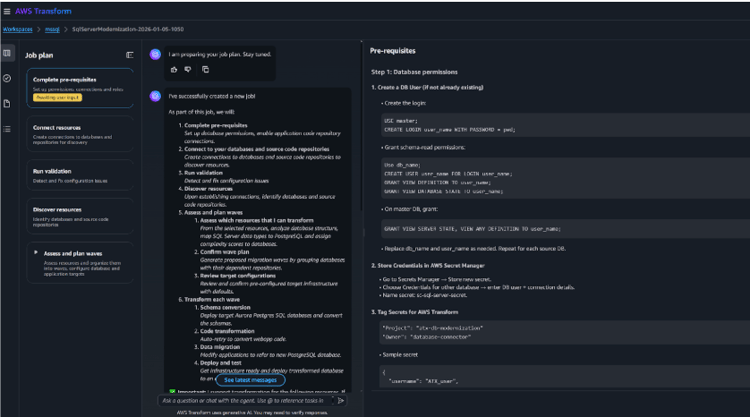
AWS Transform provides all the SQL scripts needed for source database setup - CREATE LOGIN, GRANT VIEW DEFINITION, and other permission commands are clearly documented.
The Setup Experience
Connection setup required creating secrets in AWS Secrets Manager with specific tags. The service is quite particular about this - the tags must match exactly or validation fails.
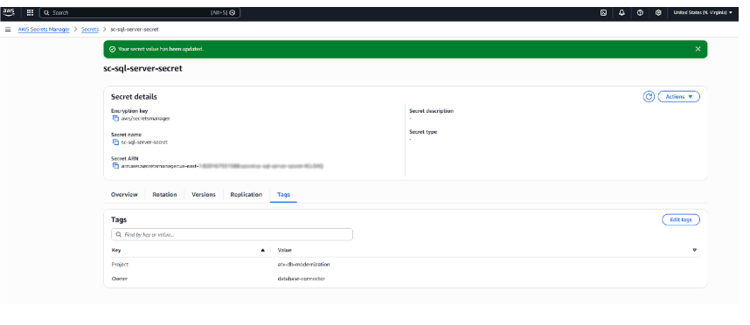
The required tags: Project: atx-db-modernization, Owner: database-connector. Miss these and you'll hit validation errors.
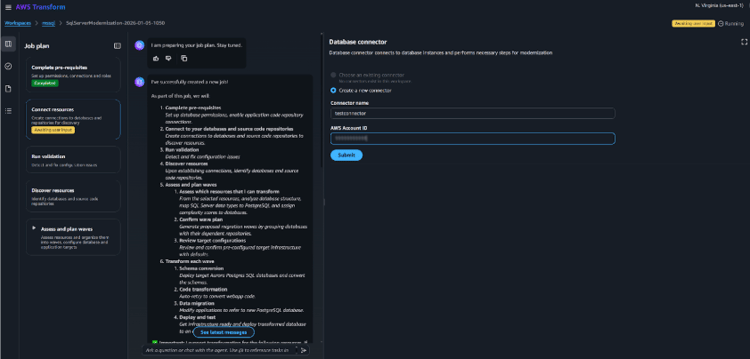
Creating the database connector - the interface is clean but offers limited customization options.
Heads up on validation
I hit a few validation errors during setup, mostly related to IAM permissions and secret configurations. The error messages were helpful though - they pointed me to exactly what needed fixing.
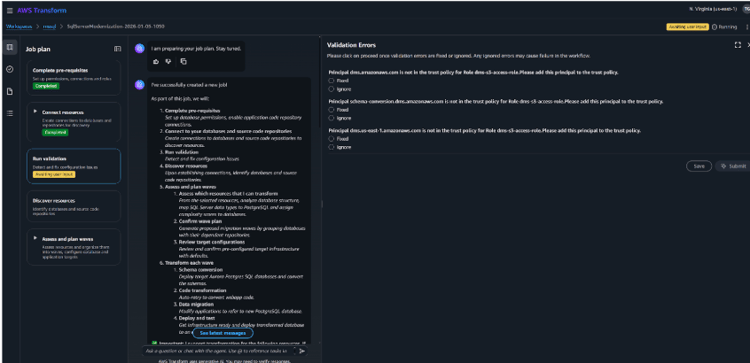
Validation errors were clear and actionable - each one explaining what needed to be fixed.
Target Database: Aurora PostgreSQL 15+ Only
Here's the first significant limitation I encountered: AWS Transform only supports Aurora PostgreSQL 15+ as a target. If you were hoping to convert to standard PostgreSQL, MySQL, or any other database - you're out of luck for now.
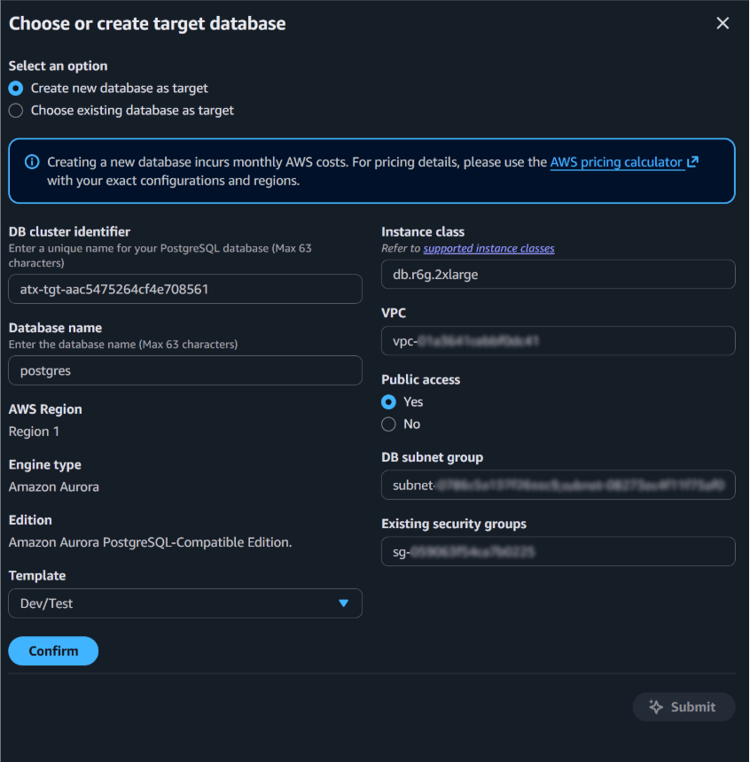
Target database options are limited to Aurora PostgreSQL. You can use an existing database, but it must be version 15 or higher.
The service can create a new Aurora PostgreSQL database for you, or you can connect to an existing one - but that existing database must be PostgreSQL 15+. No flexibility on the engine choice.
The GenAI Magic: Where It Really Shines
Now for the exciting part. I ran the same database through both AWS Transform and our traditional local SCT setup. The difference in handling complex SQL statements was dramatic. Below are real-world examples comparing the conversion results.
Example 1: The MERGE Statement Challenge
MSSQL's MERGE statement has historically been a conversion nightmare. It performs INSERT, UPDATE, or DELETE operations in a single statement. Here's what happened when both tools tried to convert the same procedure:
Original MSSQL stored procedure (CategoryReferenceCodeCreate) with MERGE statement - a common pattern in SQL Server applications.
CREATE PROCEDURE [apiGlobal].[CategoryReferenceCodeCreate]
(
	@appId INT,
    @categoryId INT,
    @referenceCode NVARCHAR(50),
	@companyGuid UNIQUEIDENTIFIER
)
AS
BEGIN
	IF @categoryId IS NOT NULL
	BEGIN
		SELECT TOP 1 c.CategoryID
		INTO #validate
		FROM Category c
		WHERE c.CompanyGuid = @companyGuid
			AND c.CategoryID = @categoryId

		IF @@ROWCOUNT = 0
		BEGIN RAISERROR('Invalid Category Id', 16, 1) RETURN END
		DROP TABLE #validate
	END


MERGE CategoryReferenceCode AS target
	USING (VALUES (@appId, @categoryId, @referenceCode))
      AS source (AppId, CategoryId, ReferenceCode)
ON (target.CategoryId = source.CategoryId AND target.AppID = source.AppId)
WHEN MATCHED THEN
	UPDATE SET target.ReferenceCode = source.ReferenceCode
WHEN NOT MATCHED THEN
	INSERT (AppId, CategoryId, ReferenceCode)
	VALUES(source.AppId, source.CategoryId, source.ReferenceCode);

SELECT TOP 1 crc.CategoryReferenceCodeID AS Id,
	crc.AppId,
	crc.CategoryID,
	crc.ReferenceCode
FROM CategoryReferenceCode crc
INNER JOIN Category c
	ON c.CategoryID = crc.CategoryID
WHERE
	crc.CategoryID = @categoryId
	AND crc.AppID = @appId
	AND c.CompanyGuid = @companyGuid
ORDER BY CategoryReferenceCodeID DESC
END;
Local SCT conversion failed with CRITICAL error: "Transformer error occurred in mergeUsingClause. Please submit report to developers." The entire MERGE block is commented out.
CREATE OR REPLACE PROCEDURE apiglobal.categoryreferencecodecreate(IN par_appid integer, IN par_categoryid integer, IN par_referencecode character varying, IN par_companyguid uuid, INOUT p_refcur refcursor)
 LANGUAGE plpgsql
AS $procedure$
DECLARE
    sql$rowcount BIGINT;
BEGIN
    IF par_categoryId IS NOT NULL THEN
        CREATE TEMPORARY TABLE t$validate
        AS
        SELECT
            c.categoryid
            FROM salessql_dbo.category AS c
            WHERE c.companyguid = par_companyGuid AND c.categoryid = par_categoryId
            LIMIT 1;
        GET DIAGNOSTICS sql$rowcount = ROW_COUNT;

        IF sql$rowcount = 0 THEN
            RAISE 'Error %, severity %, state % was raised. Message: %.', '50000', 16, 1, 'Invalid Category Id' USING ERRCODE = '50000';
            RETURN;
        END IF;
        DROP TABLE t$validate;
    END IF;
    /*
    [9996 - Severity CRITICAL - Transformer error occurred in mergeUsingClause. Please submit report to developers.]
    MERGE CategoryReferenceCode AS target
    	USING (VALUES (@appId, @categoryId, @referenceCode))
          AS source (AppId, CategoryId, ReferenceCode)
    ON (target.CategoryId = source.CategoryId AND target.AppID = source.AppId)
    WHEN MATCHED THEN
    	UPDATE SET target.ReferenceCode = source.ReferenceCode
    WHEN NOT MATCHED THEN
    	INSERT (AppId, CategoryId, ReferenceCode)
    	VALUES(source.AppId, source.CategoryId, source.ReferenceCode);
    */
    OPEN p_refcur FOR
    SELECT
        crc.categoryreferencecodeid AS id, crc.appid, crc.categoryid, crc.referencecode
        FROM salessql_dbo.categoryreferencecode AS crc
        INNER JOIN salessql_dbo.category AS c
            ON c.categoryid = crc.categoryid
        WHERE crc.categoryid = par_categoryId AND crc.appid = par_appId AND c.companyguid = par_companyGuid
        ORDER BY categoryreferencecodeid DESC NULLS LAST
        LIMIT 1;
    /*

    DROP TABLE IF EXISTS t$validate;
    */
    /*

    Temporary table must be removed before end of the function.
    */
END;
$procedure$
;
Our manual fix: MERGE rewritten using CTE (Common Table Expression) pattern with separate UPDATE and INSERT operations. This took significant engineering time.
CREATE OR REPLACE PROCEDURE apiglobal.categoryreferencecodecreate(IN par_appid integer, IN par_categoryid integer, IN par_referencecode character varying, IN par_companyguid uuid, INOUT p_refcur refcursor)
 LANGUAGE plpgsql
AS $procedure$
DECLARE
    sql$rowcount BIGINT;
BEGIN
    IF par_categoryId IS NOT NULL THEN
        CREATE TEMPORARY TABLE t$validate on commit drop
        AS
        SELECT
            c.categoryid
            FROM dbo.category AS c
            WHERE c.companyguid = par_companyGuid AND c.categoryid = par_categoryId
            LIMIT 1;
        GET DIAGNOSTICS sql$rowcount = ROW_COUNT;

        IF sql$rowcount = 0 THEN
            RAISE 'Error %, severity %, state % was raised. Message: %.', '50000', 16, 1, 'Invalid Category Id' USING ERRCODE = '50000';
            RETURN;
        END IF;

    END IF;

    with sl as
	   (
	    SELECT * FROM (VALUES (par_appId ,par_categoryId,par_referenceCode )) AS t
               (appId ,CategoryId,referenceCode)
	   ),
        upd as
	   (
		   update dbo.categoryreferencecode u
			SET ReferenceCode = sl.referenceCode
			from sl
			where u.CategoryId=sl.CategoryId and u.appid=sl.appId
			returning u.appid,u.CategoryId
	   )
    INSERT INTO dbo.categoryreferencecode (AppId, CategoryId, ReferenceCode)
    select sl.AppId, sl.CategoryId, sl.ReferenceCode from sl where  (sl.AppId, sl.CategoryId) not in (select f.AppId, f.CategoryId from upd f);


    OPEN p_refcur FOR
    SELECT
        crc.categoryreferencecodeid AS id, crc.appid, crc.categoryid, crc.referencecode
        FROM dbo.categoryreferencecode AS crc
        INNER JOIN dbo.category AS c
            ON c.categoryid = crc.categoryid
        WHERE crc.categoryid = par_categoryId AND crc.appid = par_appId AND c.companyguid = par_companyGuid
        ORDER BY categoryreferencecodeid DESC NULLS FIRST
        LIMIT 1;
END;
$procedure$;
AWS Transform GenAI result: Successfully converted to PostgreSQL MERGE syntax automatically. Note the GenAI markers clearly identifying the AI-generated code.
CREATE OR REPLACE PROCEDURE apiglobal.categoryreferencecodecreate(IN par_appid integer, IN par_categoryid integer, IN par_referencecode character varying, IN par_companyguid uuid, INOUT p_refcur refcursor)
 LANGUAGE plpgsql
AS $procedure$
DECLARE
    sql$rowcount BIGINT;
BEGIN
    IF par_categoryId IS NOT NULL THEN
        CREATE TEMPORARY TABLE t$validate
        AS
        SELECT
            c.categoryid
            FROM salessql_dbo.category AS c
            WHERE c.companyguid = par_companyGuid AND c.categoryid = par_categoryId
            LIMIT 1;
        GET DIAGNOSTICS sql$rowcount = ROW_COUNT;

        IF sql$rowcount = 0 THEN
            RAISE 'Error %, severity %, state % was raised. Message: %.', '50000', 16, 1, 'Invalid Category Id' USING ERRCODE = '50000';
            RETURN;
        END IF;
        DROP TABLE t$validate;
    END IF;

	/* [7744 - Severity INFO - This conversion uses machine learning models that generate predictions based on patterns in data. Output generated by a machine learning model is probabilistic and should be evaluated for accuracy as appropriate for your use case, including by employing human review of such output.] */
    /* vvv ---- Beginning of statement generated using GenAI. ---- vvv */
    MERGE INTO salessql_dbo.categoryreferencecode AS target
    USING (VALUES ( par_appId, par_categoryId, par_referenceCode)) AS source (appid, categoryid, referencecode)
            ON (target.categoryid = source.categoryid AND target.appid = source.appid)
    WHEN MATCHED
            THEN UPDATE SET referencecode = source.referencecode
    WHEN NOT MATCHED
            THEN INSERT (appid, categoryid, referencecode)
                VALUES ( source.appid, source.categoryid, source.referencecode);
    /* ^^^ ---- End of statement generated using GenAI. ---- ^^^ */

    OPEN p_refcur FOR
    SELECT
        crc.categoryreferencecodeid AS id, crc.appid, crc.categoryid, crc.referencecode
        FROM salessql_dbo.categoryreferencecode AS crc
        INNER JOIN salessql_dbo.category AS c
            ON c.categoryid = crc.categoryid
        WHERE crc.categoryid = par_categoryId AND crc.appid = par_appId AND c.companyguid = par_companyGuid
        ORDER BY categoryreferencecodeid DESC NULLS LAST
        LIMIT 1;
    /*

    DROP TABLE IF EXISTS t$validate;
    */
    /*

    Temporary table must be removed before end of the function.
    */
END;
$procedure$;
AWS Transform (GenAI): Successfully converted MERGE to PostgreSQL MERGE
Local SCT: CRITICAL error - required manual CTE rewrite
Example 2: FORMAT Function Conversion
The FORMAT function in MSSQL formats values with specified patterns. PostgreSQL doesn't have a direct equivalent, requiring conversion to TO_CHAR function.
Original MSSQL function (GetProductSku) using FORMAT(GETDATE(), 'EPNyyyyMMddhhmmssfff0') for SKU generation.
CREATE FUNCTION [dbo].[GetProductSku]
(
	@variant VARCHAR(20),
	@colourId INT = 0,
	@colourName VARCHAR(20) = NULL
)
RETURNS VARCHAR(34)
AS
BEGIN
	DECLARE @sku VARCHAR(34);

	SELECT
		@sku = FORMAT(GETDATE(), 'EPNyyyyMMddhhmmssfff0')

	IF @colourId <> 0
	BEGIN
		SELECT @sku = @sku + ' ' + SUBSTRING(@colourName, 0, 15)
	END

	SELECT @sku = SUBSTRING(@sku + ' ' + @variant, 0, 34)

	RETURN @sku
END
;
Local SCT conversion failed: "PostgreSQL doesn't support the FORMAT(VARCHAR,VARCHAR) function. DMS SC skips this unsupported function." The code is commented out.
CREATE OR REPLACE FUNCTION dbo.getproductsku(par_variant character varying, par_colourid integer DEFAULT 0, par_colourname character varying DEFAULT NULL::character varying)
 RETURNS character varying
 LANGUAGE plpgsql
AS $function$
DECLARE
    var_sku VARCHAR(34);
BEGIN
    /*
    [7811 - Severity CRITICAL - PostgreSQL doesn't support the FORMAT(VARCHAR,VARCHAR) function. DMS SC skips this unsupported function in the converted code. Create a user-defined function to replace the unsupported function.]
    SELECT
    		@sku = FORMAT(GETDATE(), 'EPNyyyyMMddhhmmssfff0')
    */
    IF par_colourId <> 0 THEN
        SELECT
            var_sku || ' ' || SUBSTR(par_colourName, 0, 15)
            INTO var_sku;
    END IF;
    SELECT
        SUBSTR(var_sku || ' ' || par_variant, 0, 34)
        INTO var_sku;
    RETURN var_sku;
END;
$function$;
Our manual fix: FORMAT replaced with TO_CHAR(now(), ...) - required understanding both MSSQL and PostgreSQL date formatting patterns.
CREATE OR REPLACE FUNCTION dbo.getproductsku(par_variant character varying, par_colourid integer DEFAULT 0, par_colourname character varying DEFAULT NULL::character varying)
 RETURNS character varying
 LANGUAGE plpgsql
AS $function$
DECLARE
    var_sku VARCHAR(34);
BEGIN
    /*
    [7811 - Severity CRITICAL - PostgreSQL doesn't support the FORMAT(VARCHAR,VARCHAR) function. Create a user-defined function.]
        */
   var_sku:= TO_CHAR(now(), 'EPNyyyyMMddhhmmssFF30');

    IF par_colourId <> 0 THEN
        SELECT
            var_sku || ' ' || SUBSTR(par_colourName, 0, 15)
            INTO var_sku;
    END IF;
    SELECT
        SUBSTR(var_sku || ' ' || par_variant, 0, 34)
        INTO var_sku;
    RETURN var_sku;
END;
$function$;
AWS Transform GenAI result: Automatically converted to TO_CHAR(clock_timestamp(), ...) with proper format pattern translation.
CREATE OR REPLACE FUNCTION dbo.getproductsku(par_variant character varying, par_colourid integer DEFAULT 0, par_colourname character varying DEFAULT NULL::character varying)
 RETURNS character varying
 LANGUAGE plpgsql
AS $function$
DECLARE
    var_sku VARCHAR(34);
BEGIN
    /* [7744 - Severity INFO - This conversion uses machine learning models that generate predictions based on patterns in data. Output generated by a machine learning model is probabilistic and should be evaluated for accuracy as appropriate for your use case, including by employing human review of such output.] */
    /* vvv ---- Beginning of statement generated using GenAI. ---- vvv */
    SELECT TO_CHAR(clock_timestamp(), 'EPNyyyyMMddhhmmssfff0')
        INTO var_sku;
    /* ^^^ ---- End of statement generated using GenAI. ---- ^^^ */

    IF par_colourId <> 0 THEN
        SELECT
            var_sku || ' ' || SUBSTR(par_colourName, 0, 15)
            INTO var_sku;
    END IF;
    SELECT
        SUBSTR(var_sku || ' ' || par_variant, 0, 34)
        INTO var_sku;
    RETURN var_sku;
END;
$function$;
Our manual fix: FORMAT replaced with TO_CHAR(now(), ...) - required understanding both MSSQL and PostgreSQL date formatting patterns.
The Dual Report Approach
AWS Transform generates two separate reports:
- Standard SCT Report - Traditional conversion assessment (like what you'd get from local SCT)
- GenAI Conversion Report - Details on what AI was able to additionally convert
I appreciate this transparency. You can clearly see what was converted traditionally versus what needed AI intervention. Every AI-generated block comes with a warning that the output should be reviewed - which is the right approach.
Important caveat from AWS
"This conversion uses machine learning models that generate predictions based on patterns in data. Output generated by a machine learning model is probabilistic and should be evaluated for accuracy as appropriate for your use case, including by employing human review of such output."
The PostgreSQL 15+ Requirement: An Untested Scenario
Here's an interesting detail for those who've been doing migrations for a while. In our earlier projects, PostgreSQL didn't support MERGE at all. We had to either:
- Split MERGE into separate UPDATE + INSERT statements using CTE patterns
- Convert to INSERT ... ON CONFLICT (UPSERT) syntax
Since MERGE support landed in PostgreSQL 15, AWS Transform can now do direct MERGE-to-MERGE conversion. But this raises an important question about GenAI's true capabilities.
What we couldn't test
Since AWS Transform only supports PostgreSQL 15+, we couldn't evaluate how GenAI would handle MERGE conversion for older PostgreSQL versions. Would it use a CTE pattern with separate UPDATE + INSERT? Would it convert to INSERT ... ON CONFLICT (UPSERT) syntax? Or something entirely different? The MERGE-to-MERGE conversion we observed demonstrates GenAI's syntax translation ability, but doesn't reveal its capacity for complex structural refactoring—converting one pattern to an entirely different pattern.
This is worth noting if you're evaluating AWS Transform's GenAI capabilities. The impressive results we saw were essentially one-to-one syntax translations. Whether GenAI can perform true structural transformations remains an open question.
What I Liked and What Needs Work
The Good
- GenAI conversions actually work - statements that were previously impossible to auto-convert now just... work
- Integrated workflow - SCT + DMS in one interface, no context switching
- Automatic DMS task creation - no more manual task configuration
- Clear documentation in code - AI-generated blocks are clearly marked with explanatory comments
- Conversational AI assistant - helpful for navigating the process
The Not-So-Good
- Aurora PostgreSQL lock-in - no other target databases supported
- Limited configuration options - can't customize schema prefixes, type mappings, or other SCT settings
- Default naming conventions - dbo schema becomes sales_dbo automatically, no control over this
- Long processing times - schema conversion took 4-5+ hours on my test database (it finished overnight)
- PostgreSQL 15+ requirement - can't use existing databases on older versions
The Bottom Line
AWS Transform SQL represents a genuine step forward in database migration tooling. The GenAI component isn't marketing fluff - it actually solves real conversion problems that have plagued database engineers for years.
Use AWS Transform when:
- Your target is Aurora PostgreSQL 15+
- Your database has complex SQL that traditional tools struggle with
- You want a streamlined, guided experience
-
You're okay with default conversion settings
Stick with traditional SCT + DMS when:
- You need fine-grained control over conversion settings
- Your target is something other than Aurora PostgreSQL
- You have specific schema naming requirements
- You need to support older PostgreSQL versions
My recommendation
Test AWS Transform on a representative subset of your database first. Review the GenAI-converted code carefully - it's good, but "trust but verify" applies here. The time savings on complex conversions can be substantial, but don't skip testing.
Database migration is never going to be fully automated - there's too much business logic and edge cases involved. But AWS Transform SQL with GenAI gets us closer than we've ever been. For the right use cases, it's a game-changer.
AWS Aurora DSQL: General Overview
.png)
Kubernetes 1.33: What’s new?

No Comments Yet
Let us know what you think