
.svg "kloia.png")
By Omer Faruk Urhan on Feb 10, 2026, 2:29:58 PM
.png)
As VMware licensing costs continue to rise, many infrastructure teams are rethinking their virtualization strategy. The question we hear more often now isn’t “Should we modernize?” but rather “What should we modernize to?”
Kubernetes-native platforms are quickly becoming the default answer. Instead of running separate stacks for virtual machines and containers, organizations are looking for solutions that can handle both, ideally under a single control plane.
Two names that frequently come up in this conversation are SUSE Harvester and Red Hat OpenShift.
Both promise modern, Kubernetes-based virtualization. Both can replace traditional hypervisors in on-prem environments. But once you look closer, their design philosophies, and the experience they offer, are quite different.
Here’s what stands out after evaluating both platforms in real-world scenarios.
A Different Starting Point
OpenShift was built for containers. VMs came later, bolted on through KubeVirt and KVM, and that's not a criticism, it works well. But the origin matters because it shapes everything: how workloads are scheduled, how networking is handled, how the whole system feels when you're operating it day to day. Containers and VMs sit in the same cluster, managed the same way. If you're running a mix of both, that coherence is genuinely useful.
Harvester comes from the other direction. It's a hyperconverged infrastructure platform that happens to run on Kubernetes. VMs are clearly the priority. Container support is there, but it's not where the platform shines. For shops that are mostly running virtual machines and want to keep it that way, that's perfectly fine. But if containers are a real part of your roadmap, not just a checkbox, you'll bump into limitations faster than you'd expect.
Flexibility Matters More Than You Think
Small environments can usually get by with defaults. The moment you start scaling, or the moment someone from the network team asks why you can't swap out the CNI, flexibility becomes a much bigger deal.
OpenShift gives you room to move. Networking, storage, integrations, most of it is configurable. You can bring in your own CNI or CSI plugins, wire things up to existing enterprise tooling, and shape the platform around your requirements rather than the other way around. That kind of optionality sounds abstract until you actually need it.
Harvester is more locked down by design. The components are predefined, the choices are fewer. For smaller teams or simpler environments, that's actually a relief, less to configure, less to get wrong. But in larger enterprises with specific compliance requirements or existing tooling they need to integrate with, those constraints start to feel like walls.
It's basically the difference between a platform that hands you the keys and one that drives for you.
Day-to-Day Operations
Features matter, but what you're really living with is the operational experience.
OpenShift has been around long enough that most problems have already been solved somewhere. The documentation is solid, the community is large, and when something breaks, and something always breaks, you can usually find your way to an answer without too much pain. Red Hat's support structure adds another layer of confidence for production environments.
Harvester is newer and it shows. The platform is improving quickly, which is genuinely encouraging, but the ecosystem hasn't caught up yet. For a lab setup, an edge deployment, or a team that's comfortable figuring things out as they go, that's manageable. For a production environment where downtime has real consequences, the maturity gap is something you need to factor in.
What Does the Migration from VMware Actually Look Like?
With Harvester, the path is relatively familiar. You export your VMDKs, convert them to raw or qcow2 format, and import them in. Anyone who's done a hypervisor migration before will recognize the process. The main work is upfront — getting your bare-metal hardware, storage, and network layout sorted before you start moving workloads. Once that foundation is in place, the actual VM migration is pretty straightforward.
OpenShift handles this differently. The Migration Toolkit for Virtualization (MTV) connects directly to vCenter, pulls your VM inventory, and manages the conversion. It works well for standard workloads. Where OpenShift has a real edge is if you're planning to eventually modernize those VMs into containers — you migrate first, keep things running as-is, and containerize on your own timeline. If you have no intention of ever touching containers, you might be over-investing in platform.
On cost: Harvester is the more affordable option, and the open-source route is viable for smaller setups. OpenShift subscriptions run higher but the support and ecosystem justify it in larger enterprise environments.
The technical migration is rarely the hard part. Teams that have spent years in vSphere have processes and habits built around it — Kubernetes-native platforms think about networking and storage differently, and that adjustment takes time. Plan for it.
Release Pace and Platform Evolution
OpenShift ships updates frequently, and those updates tend to include meaningful changes, new capabilities, performance improvements, tighter alignment with what's happening in the broader Kubernetes ecosystem. The platform moves.
Harvester's release cadence is slower and more conservative. That's not necessarily a problem, but it does mean you're waiting longer for improvements, and innovation happens at a different pace. Depending on how fast your requirements are evolving, that might matter a lot or barely at all.
So, Which One Should You Choose?
If you're running large-scale production workloads, need containers and VMs to coexist cleanly, care about customization, or want the backing of a mature enterprise ecosystem, OpenShift is the safer long-term call. The investment is higher, but so is the ceiling.
If you want something straightforward to deploy, your workloads are mostly VMs, you're operating at smaller scale or at the edge, and you'd rather not deal with the operational weight of a full OpenShift deployment, Harvester is a solid, lightweight option that doesn't try to be more than it is.
Both platforms are capable. The question isn't really which one is better in the abstract. It's which one fits where your infrastructure needs to be two or three years from now.
| HARVESTER | OPENSHIFT VIRTUALIZATION | ||
| Architecture | Core Components | Longhorn (storage), KubeVirt, Harvester UI | OpenShift, KubeVirt, OpenShift Console |
| KVM Usage | Yes | Yes | |
| Kubernetes Integration | Runs on built-in Kubernetes | Integrated into OpenShift's managed Kubernetes platform |
|
| Installation and Management | Installation Method | ISO-based bare-metal installation | Installed via OperatorHub in OpenShift |
| Upgrade Process | Managed through Harvester UI | Lifecycle managed by OpenShift | |
| User Interface | Web-based UI / Integrated into Rancher Console | Integrated into OpenShift Console | |
| Networking | Network Solution | Multus, Canal (calico + flannel) (default CNI) | OpenShift SDN, OVN-Kubernetes, Multus (defaults) Also support external CNI like tigera, isovalent etc. |
| VLAN/Vnet Support | Yes | Yes | |
| SR-IOV Support | Yes | Yes | |
| Storage | Local Storage | Longhorn, LVM, NFS, Rook | Any CSI-compatible storage supported |
| Live Migration | Yes (except LVM) | Yes (requires shared storage backend) | |
| Snapshot & Backup | Only Supported for Longhorn V1 Data Engine | Snapshot support and backup via OADP/Velero, Veeam Kasten |
|
| VM Management | Cloud-Init Support | Yes | Yes |
| VM Templates | Yes | Yes | |
| VM Migration | Yes | Yes | |
| Firewall Support | No | Yes | |
| GPU Passthrough | Yes (it has some limitations) | Full support (with SR-IOV and GPU Operator) | |
| Workload Types | Virtual Machine | Yes | Yes |
| Containers | Yes | Yes | |
| Hybrid (VM + Containers) | Limited | Fully supported | |
| Cost | Cost Effectiveness | Cost-effective (open-source with paid support from SUSE) |
Moderate to high cost (subscription-based, cost depends on the level of support) |
| Integrations and Ecosystem | CI/CD Integration | Limited | Fully supported via OpenShift Pipelines and OpenShift GitOps |
| IaaC Support | Limited | Moderate | |
| Monitoring | Prometheus, Rancher UI | OpenShift-native monitoring stack (Prometheus, Grafana) | |
| Support and Community | Enterprise Support | Provided by SUSE | Provided by Red Hat |
| Communnity Size | Growing | Large and established | |
| Documentation | Moderate | Extensive and enterprise-ready | |
| Use Cases | Edge Computing | Ideal for lightweight bare-metal deployments | Less optimized for edge scenarios |
| Enterprise VM Management | Moderately suitable | Highly suitable for data center workloads | |
| Hybrid Cloud | Possible via Rancher | Fully supported via Red Hat ACM and OpenShift |
Conclusion
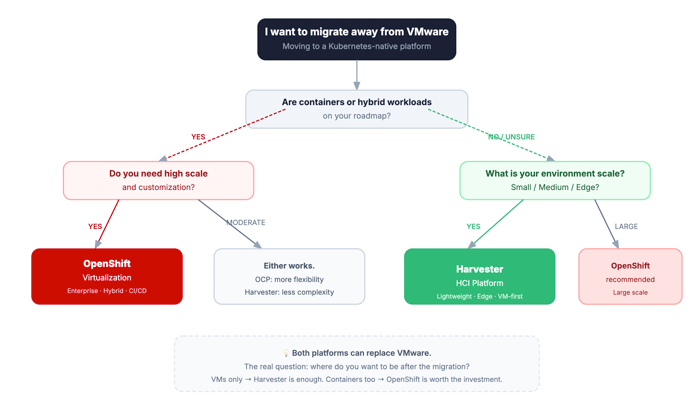
Both platforms can replace VMware. That part isn't really up for debate anymore.
The question is what comes after the migration. If your environment is mostly VMs and you want to keep it that way, Harvester does the job without dragging in complexity you don't need. It's honest about what it is.
OpenShift asks more of you upfront, more configuration, more cost, more learning curve. But if containers and hybrid workloads are somewhere on your roadmap, that investment starts making sense. You're not just replacing VMware, you're building something you can actually grow into.
If you just want a clean VMware exit and keep running VMs, Harvester is probably enough. If you're already talking about containers internally, OpenShift is a different conversation. The real question isn't technology. It's whether your team is ready for that shift.

Kubernetes in the cloud: AKS vs EKS
Kubernetes 1.34: Fine-Grained Container Restart Policies
No Comments Yet
Let us know what you think